
Introduction
ADCS certificate mapping allows an Active Directory (AD) account (user or computer) to authenticate using a certificate and the associated private key. The certificate must reference the account used so that the Key Distribution Center (KDC) can validate and enable authentication. Thus, the PKINIT (Public Key Cryptography for Initial Authentication) extension of the Kerberos protocol will allow authentication based on the information contained in the certificate. The word Mapping thus corresponds to the way in which the certificate is linked to the Active Directory account.
There are two types of certificate mapping: Implicit mapping and explicit mapping.
- Implicit mapping is done from the User Principal Name (UPN) of the user account, or from the DNSHostName1 from the computer account. This information will be indicated in the Subject Alternative Name (SAN) of a certificate with an Extended Key Usage authentication (Client Authentication and/or Server Authentication).
The information linking the certificate to an Active Directory account is therefore entered directly in the certificate, hence the name Implicit mapping.
- Explicit mapping, on the other hand, will have the certificate information (issuing CA, certificate serial number, etc.) entered into the AltSecurityIdentities attribute of the Active Directory account. This difference is what makes the mapping explicit.
These two mapping types cannot be used together. Only one of these two methods needs to be configured across the entire domain. The default mapping method used is the implicit method (via SAN).
Certificate mapping can be implicit or explicit, and strong or weak. These two concepts work together. There are therefore 4 different options that can be used to map a certificate to an Active Directory account:
| Mapping Type | Robustness |
|---|---|
| Implicit | Strong |
| Implicit | Weak |
| Explicit | Strong |
| Explicit | Weak |
Before understanding what a strong or weak mapping is, it is necessary to delve deeper into the two types of mappings that exist.
The different types of mapping
Implicit mapping via SAN
As explained previously, this method involves specifying the user’s UPN, or the computer account’s dNSHostName, in the certificate’s SAN. This allows Active Directory to find the account corresponding to the presented certificate by searching for it via its UPN/dNSHostName.
When creating a certificate template with AD CS, the UPN or DNS Name must be checked in the Subject Name tab for this type of mapping to take place :

The UPN / DNSHostName is then entered in the certificate at the SAN level during enrollment:

As a reminder, this method is the default and must be disabled if the use of Explicit Mapping is desired.
Using this type of mapping :
- Each certificate can only be associated with one user account.
- It is mandatory to enter the user’s UPN / DNSHostName of the machine in the SAN of the certificate.
- The certificate must contain the SID extension szOID_NTDS_CA_SECURITY_EXT to be considered strongly mapped.
- It follows from the two previous points that compatibility with external PKIs (other than AD CS) is complicated and even uncertain.
Caution: This mapping type is considered weak mapping unless the certificate contains the szOID_NTDS_CA_SECURITY_EXT SID extension from KB5014754 of May 10, 2022 (more details in the “May 10, 2022 Update (KB5014754)” section).
Starting February 11, 2025, authentications with this mapping method will fail if certificates do not have the szOID_NTDS_CA_SECURITY_EXT SID extension.
Explicit mapping via the AltSecurityIdentities attribute
This second mapping method involves adding certificate information to the AltSecurityIdentities attribute of the associated user or computer account(s).
During authentication, the domain controller will be able to check the AltSecurityIdentities attribute of the specified account and verify that the information in the presented certificate matches the information contained in the attribute.
There are six ways to populate the AltSecurityIdentities attribute:
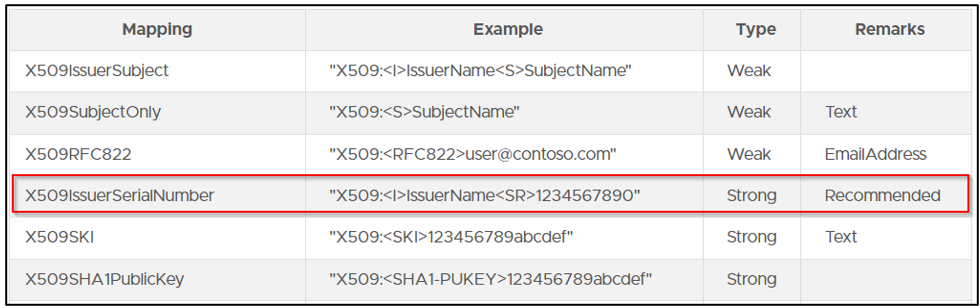
The default method is to enter the certificate’s Issuer and Subject values in the attribute. This method is not recommended. Two different certificates can have the same values in the Issuer and Subject fields.
The recommended method is to enter the certificate’s Issuer and Serial Number values (which correspond to the issuing CA and the certificate’s serial number, respectively) in the AltSecurityIdentities attribute. This type of mapping is considered a strong mapping.
Using this type of mapping :
- Each certificate can be associated with multiple user accounts.
- The same person can therefore authenticate on several different accounts with the same certificate.
- An additional field must be added to the Windows logon screen to specify the account with which to log in.
- It is not mandatory to enter the user’s UPN in the SAN of the certificate.
- If this is filled in, the mapping will still work (so there is no need to change the certificate template when you want to transition from the first mapping method to the second).
- This mapping method is much more flexible regarding certificates from external PKIs (outside AD CS).
Summary of the different types of Mapping
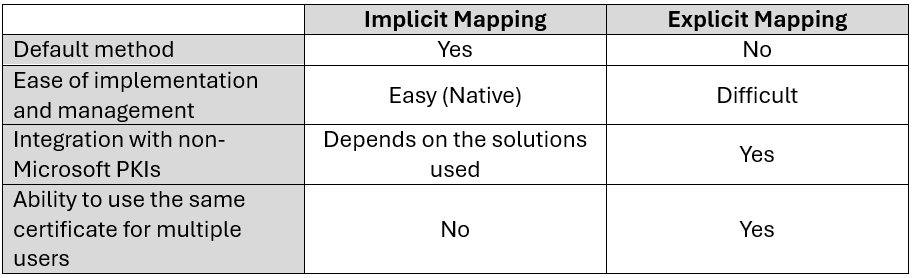
Updated May 10, 2022 (KB5014754)
Update Details
There are some techniques that allow you to exploit the mapping between Active Directory accounts and certificates in order to gain access as others (BuiltinAdministrator for example).
This generated multiple vulnerabilities (CVE-2022-34691, CVE-2022-26931 and CVE-2022-26923), following which Microsoft released a Patch (KB5014754) on May 10, 2022, which includes the following features:
- Certificates issued by ADCS servers will contain the szOID_NTDS_CA_SECURITY_EXT extension (OID 1.3.6.1.4.1.311.25.2) which references the AD account SID in addition to the UPN (or DNSName for a machine object) contained in the SAN.
This SID makes it possible to undeniably identify the legitimate owner of the certificate when the SAN is automatically filled in from the AD information. - When performing Kerberos authentication with PKINIT, the KDC service of domain controllers will check for the presence of:
- Either a strong certificate reference for a user (strong certificate mapping using the altSecurityIdentities attribute of the user object) –> Explicit Mapping.
- Either the presence of the szOID_NTDS_CA_SECURITY_EXT extension referencing the user’s SID in the certificate (OID: 1.3.6.1.4.1.311.25.2) –> Implicit Mapping.
- Added new events in the System event log (event numbers 39, 40 and 41).
Along with its new szOID_NTDS_CA_SECURITY_EXT extension used in implicit mapping, Microsoft has deployed 2 registry keys to configure certificate mapping to fix CVE-2022-26923 (certifried.md) with the famous KB5014754:
- The StrongCertificateBindingEnforcement registry key for Kerberos mapping (used in Kerberos authentication)
- The CertificateMappingMethods registry key for SChannel mapping (Schannel authentication).
Changes and impacts
Important : Starting February 11, 2025, Microsoft will push an update to ensure that authentications with certificates that do not meet the mapping criteria are refused.
Only the following certificates will be authorized :
- Certificates mapped via the SubjectAltName and have the SID extension szOID_NTDS_CA_SECURITY_EXT.
- Certificates mapped via AltSecurityidentities with strong mapping.
Certificates issued before the AD CS server update do not contain the SID extension.
In the case of implicit mapping via the SAN, these certificates must be reissued to ensure a strong mapping.
In the case of explicit mapping via the AltSecurityIdentities attribute, these certificates do not need to be reissued.
Authentication methods
As previously mentioned, two registry keys have been integrated into the May 2022 update. These registry keys are intended to allow legacy certificates (which did not have the new szOID_NTDS_CA_SECURITY_EXT extension) to still allow authentication.
These registry keys are therefore intended to ensure compatibility and enable a smooth transition to strong mapping methods.
So we have the two registry keys :
- HKEY_LOCAL_MACHINESystemCurrentControlSetControlSecurityProvidersSchannelCertificateMappingMethods : for Schannel authentication.
- HKEY_LOCAL_MACHINESYSTEMCurrentControlSetServicesKdcStrongCertificateBindingEnforcement : for Kerberos authentication.
To support this compatibility mode, Microsoft has also added the CT_FLAG_NO_SECURITY_EXTENSION flag to the msPKI-Enrollment-Flag attribute on each certificate template. If this flag is present, the certificate authority will not include the objectSid in the new szOID_NTDS_CA_SECURITY_EXT extension (one of the ESC9 prerequisites).
StrongCertificateBindingEnforcement – (Kerberos Authentication)
In the case of Kerberos authentication, strong implicit certificate mapping means that the certificate will use the new szOID_NTDS_CA_SECURITY_EXT extension to validate the information contained in the certificate’s SAN (UPN or dNSHostName).
For strong explicit mapping, it is necessary to use one of the mapping types recommended by Microsoft to populate the data in the AD account’s altSecurityIdentities attribute.
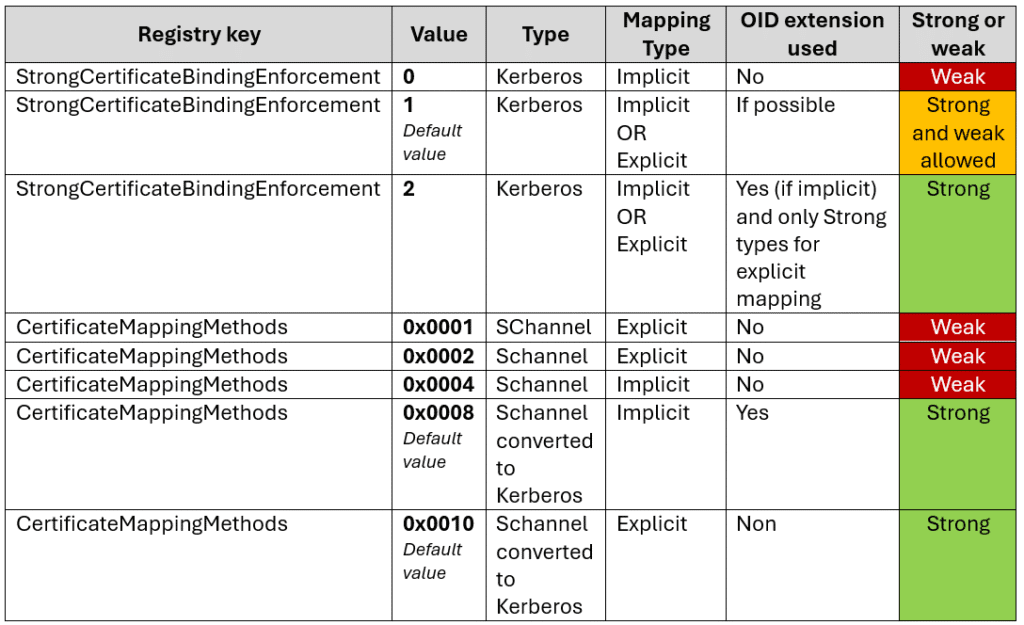
When performing Kerberos authentication, the StrongCertificateBindingEnforcement registry key can take 3 values:
- 0: Strong mapping is not used.
The szOID_NTDS_CA_SECURITY_EXT extension will not be checked for implicit mapping (even if present in the certificate) and all types of explicit mappings will be allowed. This is therefore a maximum compatibility behavior, as it is equivalent to not changing anything after the 2022 patch. This mode is no longer operational since April 11, 2023 and setting the key to 0 now is equivalent to setting it to the value 1. - 1: Default – Transition to a strong mapping method.
With this value, the KDC will check whether an implicit strong mapping type is used. Thus, if the szOID_NTDS_CA_SECURITY_EXT extension is present, then authentication will be allowed. If it is not, authentication will still occur, but with the information contained in the SAN (pre-patch method). Any authentication based on an explicit mapping will be allowed (weak or strong).
This transition period, with this registry key value, will be disabled on February 11, 2025. - 2 : Strong mapping only.
For implicit mapping, the szOID_NTDS_CA_SECURITY_EXT extension must be present and contain the AD account SID. For explicit mapping, only strong mapping modes will be accepted for authentication. For all other cases, authentication will be rejected. - This mode will be the default starting in February 2025.
In all cases, when the szOID_NTDS_CA_SECURITY_EXT extension is present in an implicit mapping, the KDC will compare the SID contained in the extension with the information provided in clear text in the SAN of the certificate (UPN or dNSHostName). If these information are different, authentication will be refused.
To go further
If the StrongCertificateBindingEnforcement registry key is set to 0 and the certificate contains a UPN (usually a user account), the KDC will search for a user account with that UPN. If no user is found, it will then attempt to associate the certificate’s UPN with a user’s sAMAccountName. If this fails, a $ will be appended to the end of the certificate’s UPN to try to find a matching computer account.
If the certificate contains a dNSHostName (in this case, a computer account), the KDC will separate the computer account and domain parts. For example, SRV1.sudo-ad.fr will become SRV1 and sudo-ad.fr. A $ will be appended to SRV1 (SRV1$), and the KDC will search for a computer account with that sAMAccountName.
If the StrongCertificateBindingEnforcement registry key is set to 1 or 2, and no explicit mapping is in place, the szOID_NTDS_CA_SECURITY_EXT extension will be used to map to the account’s objectSid attribute. If this extension is not present and the key is set to 1, the mapping will occur as explained above. If the extension is not present and the key is set to 2, authentication will be denied.
CertificateMappingMethods – (Authentification Schannel)
As a reminder, Microsoft Secure Channel, or SChannel, is a security package that contains several security protocols (SSL 2.0, SSL 3.0, TLS 1.0, TLS 1.1, TLS 1.2, TLS 1.3 and PCT) that provide authentication and private communication between the client and the server.
To create a secure connection, both the client and server must obtain Schannel credentials from certificates and then create a secure session. Once the connection is established, information about the credentials’ attributes and their context is available. If a connection is lost, it can be renegotiated by requesting a new connection. Before closing the connection, both the client and server must perform cleanup and delete the connection.
During Schannel authentication, the certificate mapping process will vary depending on the value of the CertificateMappingMethods registry key :
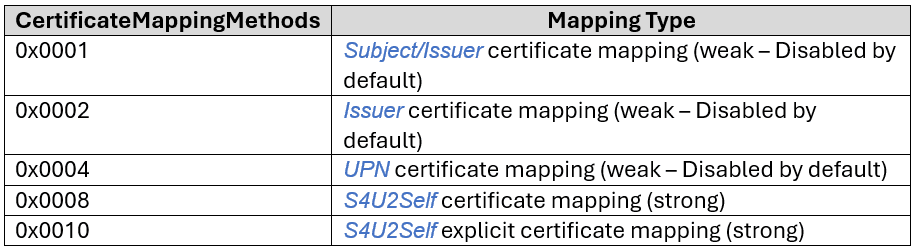
CertificateMappingMethods is a bitmask (base 64) where each bit represents a different mapping type that is supported for SChannel authentication: 0x4 for example enables UPN mapping and 0x1F enables them all (old default).
The current default value is 0x0018 (0x0008 and 0x0010). Schannel does not directly support implicit mapping via the szOID_NTDS_CA_SECURITY_EXT extension, but this mapping method can be used by converting the Schannel mapping to a Kerberos mapping using S4USelf. In this case, it will revert to the implicit mapping explained above.
Synthesis
Upcoming updates
It’s important to note that starting February 11, 2025, the default value of the StrongCertificateBindingEnforcement registry key will be 2, and modes 1 and 0 will no longer be compatible, so authentication will be denied if the mapping is weak.
All older certificates based on a weak mapping method will need to be renewed to support strong mapping.
In the event of a refused authentication, event ID 39 (or 41 for Windows Server 2008 R2 SP1 & SP2) will be available.
Fortunately, it will be possible to create the StrongCertificateBindingEnforcement registry key and set it to 1 (because if the key does not exist at this time, the default value will be 2) and maintain compatibility mode until September 10, 2025. After this date, no weak mapping will be allowed and the StrongCertificateBindingEnforcement registry key will no longer be supported.
Sources
- Link to KB5014754 :
https://support.microsoft.com/en-us/topic/kb5014754-modifications-apport%C3%A9es-%C3%A0-l-authentification-bas%C3%A9e-sur-les-certificats-sur-les-contr%C3%B4leurs-de-domaine-windows-ad2c23b0-15d8-4340-a468-4d4f3b188f16 - Windows February 2025 Update Source :
https://support.microsoft.com/en-us/topic/kb5014754-certificate-based-authentication-changes-on-windows-domain-controllers-ad2c23b0-15d8-4340-a468-4d4f3b188f16 - Flag ms-PKI-Enrollment-Flag :
https://learn.microsoft.com/en-us/openspecs/windows_protocols/ms-crtd/ec71fd43-61c2-407b-83c9-b52272dec8a1 - https://medium.com/@offsecdeer/adcs-exploitation-series-part-2-certificate-mapping-esc15-6e19a6037760
- https://www.thehacker.recipes/ad/movement/adcs/certificate-templates#explicit-certificate-mapping
- This information will be entered in the DNSName field of the certificate (SAN subcategory) ↩︎
Comments are closed